
Search Wrangell Traffic Court Records
Wrangell Traffic Court Records help you trace a citation to the filed state case, confirm a hearing date, and request copies when you need the docket or final order. The Wrangell District Court is the main office for 1WR traffic matters, and the Alaska Court System gives you a public search path through CourtView. If you only have a name, a citation number, or a rough filing date, you can still narrow the record search. This page puts the court directory, the forms path, and the nearby court contacts in one place so you can find the right record without starting over at each new office.
Where Wrangell Traffic Court Records Start
The main office for Wrangell Traffic Court Records is the Wrangell District Court, and the court directory at courts.alaska.gov/courtdir/1wr.htm is the official place to confirm the local contact details. The phone number is (907) 874-2311 and the fax number is (907) 874-3509. That office is where you check the local file once a traffic citation has moved into the court system. The 1WR prefix is the code that points the search to Wrangell, which is useful when you want to separate a local case from another Alaska district.
Wrangell traffic searches usually begin with the public records portal at records.courts.alaska.gov. CourtView lets you look up a case by party name, citation number, or case number, so it is the best first step when you need a status check or want to see whether a citation has been filed. If you need a nearby office because a question has moved beyond the local directory, the Ketchikan directory at courts.alaska.gov/courtdir/1ke.htm and the Juneau directory at courts.alaska.gov/courtdir/1ju.htm are the nearest official references listed in the research for related Superior Court resources.
The Alaska trial courts overview at courts.alaska.gov/trialcourts/ helps explain how local district offices fit into the larger court system. That is useful when you are trying to understand whether a citation belongs to the Wrangell file, a nearby court resource, or another path entirely. The right office depends on where the case was filed, not just where the ticket was written.
The Wrangell court directory on the Alaska Court System site gives the clearest local court snapshot before you call or travel.
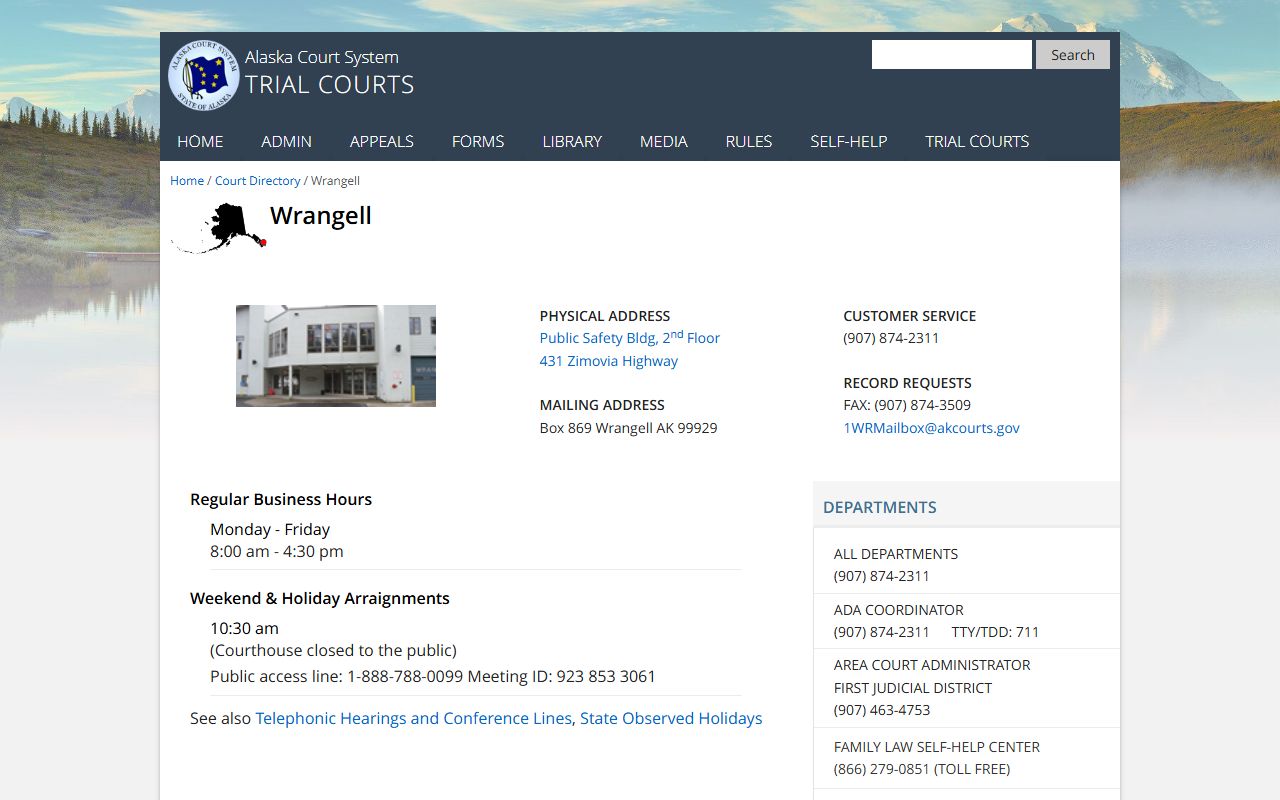
Use that directory view to confirm the 1WR office and the contact details before you ask for a file or hearing update.
Searching Wrangell Traffic Court Records in CourtView
The quickest way to search Wrangell Traffic Court Records is through CourtView. The portal is built for public case lookup, so a clean search usually starts with a citation number, a party name, or the 1WR case number if the file is already open. That prefix tells the system you are dealing with Wrangell instead of a different Alaska court location. If the case is recent, it may take a little time to appear. If the file is older, the portal may show only part of the history, which is normal for a public search tool.
Traffic self-help material at courts.alaska.gov/shc/mo/index.htm is useful when you want to understand the path a minor offense case takes after a citation is written. The self-help page explains the basic traffic flow, which helps you read the record with the right expectations. It does not replace the court file, but it makes it easier to tell whether you are looking at a filing issue, a hearing issue, or a payment issue. That matters when you only have a paper ticket and need to turn it into a usable case search.
When you search Wrangell Traffic Court Records, bring the facts that are most likely to match the filed docket. A focused request gets you farther than a broad one.
- The full name printed on the citation
- The citation number from the ticket or notice
- The 1WR case number if one has already been assigned
- The approximate date the citation was issued or filed
- Any hearing date or written notice you already received
The Alaska statutes database at www.akleg.gov/basis/statutes.asp is a useful companion when you need to understand why a deadline, response step, or hearing note appears in the record. It is not a records search by itself, but it helps explain how the traffic process works and why the docket looks the way it does. That context can make a short docket line much easier to read.
Requesting Wrangell Traffic Court Records Copies
For formal copies, Wrangell uses the standard Alaska TF-311 records request form. That form is the ordinary route for asking the clerk to release a case document, and it works best when you include a complete case number. If you do not have one, include the defendant name, the citation number, and any approximate filing date so the clerk can find the right file without guessing. That keeps the request centered on the actual court record rather than on a general traffic question.
The court directory gives you the official contact path for the local office, and the trial courts page helps you confirm the larger court structure if the request needs to move beyond Wrangell. Because traffic records often include more than one useful page, a copy request can involve the citation, the docket, the final disposition, and any related notice. A precise request makes that process smoother. It is especially helpful when the file is older or when you need a specific entry from a hearing rather than the whole case packet.
If your goal is simply to confirm that a Wrangell ticket was filed, the public portal may be enough. If your goal is to get the paper record, the TF-311 form is the safer route. The office can then use the identifiers you provide to find the right document, which is faster than making the clerk search from scratch. That is the practical difference between a lookup and a records request.
The City and Borough of Wrangell site at www.wrangell.com is a useful local reference when you want to see the municipal side of the community around the court.
That local context can help, but it does not replace the filed court record kept by the Alaska Court System.
What Wrangell Traffic Court Records Show
Wrangell Traffic Court Records usually show much more than a basic search hit. The docket can show the filing date, the charge description, whether the matter was set for hearing, and how the case ended. It may also show a payment entry, a continuance, a dismissal, or a final judgment. That is what makes the file useful. It gives you the court history behind the citation, not just the paper ticket you started with.
Not every traffic matter is visible in the same way. CourtView focuses on the public side of the case file, so confidential or sealed matters may stay out of the online display. A recent citation may also take time to appear, and an older matter may be stored in a paper file or retained record rather than in a full digital history. When a search result looks thin, the clerk can often tell you whether that is because the file is new, incomplete, or outside the public view.
For most people, the most useful parts of Wrangell Traffic Court Records are the case number, the final disposition, the hearing history, and the financial entries. Those fields show whether the court still expects action and whether the matter is closed. If you are checking a record for your own reference, those details are usually enough to confirm what happened and when it happened.
Wrangell Traffic Court Records and Nearby Court Resources
Wrangell is a smaller court location, so it helps to know the nearby official court resources when you need a second contact path. The Ketchikan directory at courts.alaska.gov/courtdir/1ke.htm and the Juneau directory at courts.alaska.gov/courtdir/1ju.htm are the closest named court references in the research for related Superior Court access. They are not a substitute for the Wrangell file, but they matter when a case has a routing question, a transfer issue, or a request that needs another official contact point.
The Wrangell city and borough site at www.wrangell.com can help you understand the local government setting, but the record you usually need for a traffic matter still sits with the state court system. That is the core rule to remember. Start with CourtView, confirm the 1WR prefix, use the directory for the local clerk, and only then reach for the TF-311 form if you need the actual file copy. That sequence keeps the search clean and avoids sending a traffic question to the wrong desk.
If the citation was issued recently, give the office time to enter the case. If it is older, work from the name, citation number, and approximate filing date. Either way, the same record path applies. The court directory points you to the office, the portal shows the public docket, and the form gets you the copy. That is the most direct way to work a Wrangell traffic case from start to finish.